Encontrar

記事
· 2024年7月29日 2m read

Onboarding with InterSystems IRIS: A Comprehensive Guide

Updated 12/09/25

Hi Community,

You can unlock the full potential of InterSystems IRIS—and help your team onboard—with the full range of InterSystems learning resources offered online and in person, for every role in your organization. Developers, system administrators, data analysts, and integrators can quickly get up to speed.

Onboarding Resources for Every Role

Developers

System Administrators

Data Analysts

System Integrators

Implementers

Project managers

Other Resources from Learning Services

  • 💻 Online Learning: Register for free at learning.intersystems.com to access self-paced courses, videos, and exercises. You can also complete task-based learning paths or role-based programs to advance your career.
  • 👩‍🏫 Classroom Training: Check the schedule of live, in-person or virtual classroom training, or request a private course for your team. Find details at classroom.intersystems.com.
  • 📘 InterSystems IRIS documentation: Comprehensive reference materials, guides, and how-to articles. Explore the documentation.
  • 📧 Support: For technical support, email support@intersystems.com.

Certification Opportunities
certification badge Once you and your team members have gained enough training and experience, get certified according to your role!

Learn from the Community

💬Engage in learning on the Developer Community: Chat with other developers, post questions, read articles, and stay updated with the latest announcements. See this post for tips on how to learn on the Developer Community.

With these learning resources, your team will be well equipped to maximize the capabilities of InterSystems IRIS, driving your organization’s growth and success. For additional assistance, post questions here or ask your dedicated Sales Engineer.
1件の新着コメント
ディスカッション (3)1
続けるにはログインするか新規登録を行ってください
ディスカッション
· 2024年7月26日

Partagez comment Developer Community IA vous a aidé pour avoir une chance de gagner

Bonjour la communauté !

Comme vous le savez peut-être, notre IA pour la communauté des développeurs est sortie depuis plus d'un mois 🎉 Nous espérons que vous avez été suffisamment curieux pour l'essayer 😁 Si ce n'est pas encore le cas, n'hésitez pas à le faire ! Quoi qu'il en soit, comme elle est encore en version bêta, nous sommes très intéressés par ce que vous en pensez, et nous avons hâte de connaître vos réflexions et vos expériences.


Comme nous apprécions votre temps et vos efforts, nous offrirons un joli prix à un membre de la communauté choisi au hasard qui partagera ses réflexions. Pour participer à ce tirage au sort, vous devez suivre les consignes suivantes :

  • soyez membre de la communauté (les employés d'InterSystems sont invités à participer)
  • écrivez un commentaire décrivant comment IA de la communauté des développeurs vous a aidé avec votre question (n'oubliez pas d'ajouter un lien* vers le résultat) dans cette discussion.

Et c'est tout ! À la fin de l'été, nous utiliserons random.org pour choisir un propriétaire de notre petit truc mignon parmi tous ceux qui ont commenté (et suivi les directives) — maximum 5 commentaires par personne.

Bonne chance !


* Pour obtenir un lien vers la réponse, cliquez sur le bouton de partage  sous la réponse

1 Comment
ディスカッション (1)2
続けるにはログインするか新規登録を行ってください
記事
· 2024年7月25日 4m read

[Case Study] Effective Source Control for Healthcare

An effective source control solution allows organizations to manage complex codebases, facilitate seamless collaboration within development teams, and streamline deployment processes.

Sonic Healthcare, a leading provider of pathology, radiology, general practice, and corporate medical services, has significantly enhanced visibility and control over its complex environment by implementing Deltanji source control. The tight integration Deltanji provides with InterSystems IRIS and IRIS for Health has been central in achieving these improvements.
 

Sonic Healthcare's Set Up 

Sonic Healthcare implemented Deltanji source control in 1999 and it has become an integral part of their system. They work with InterSystems IRIS and InterSystems IRIS for Health, using Deltanji server-side for code management and to optimize their software development and release processes. As a result, Deltanji has enabled them to streamline their release workflows and achieve close control over their overall software lifecycle. 

Sonic Healthcare has a diligent deployment process and needs to ensure that all code changes are managed consistently and productively. 

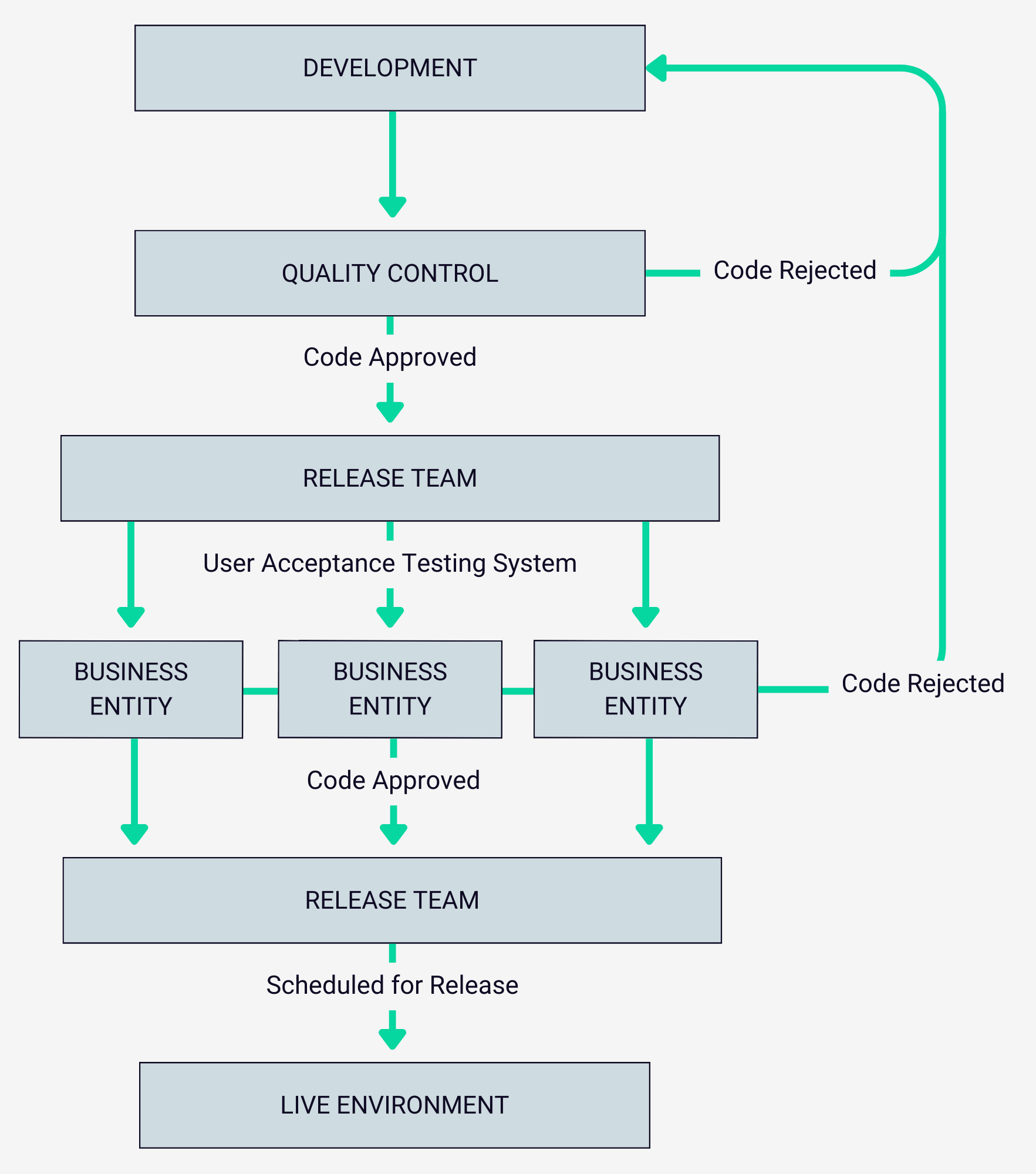
Their setup requires code from the Development Team to be passed through Quality Control and moved through to the User Acceptance Testing System, where individual business entities perform end-user testing. Once they have signed off on the development task, the Release Team then commits the code to the repository and schedules it to release to the live environment.

This entire process is managed using Deltanji Enterprise and leverages Deltanji’s configurable workflow process. It enables Sonic Healthcare to go beyond traditional CI/CD and is done easily and effectively due to Deltanji’s tight integration with InterSystems platforms. 


The Impact of Using Deltanji

Configurability
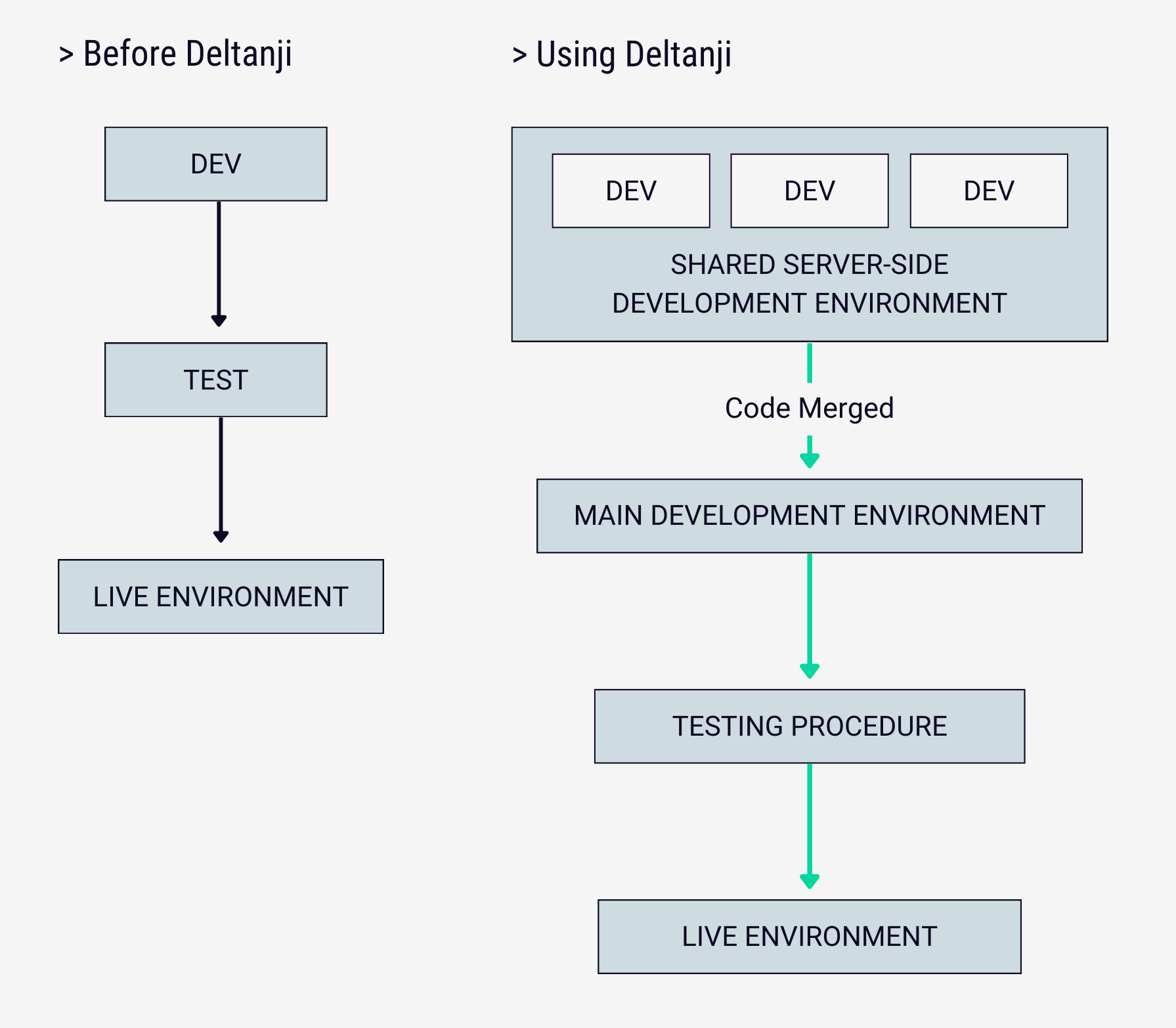
Deltanji’s configuration capabilities have provided Sonic Healthcare with a source control solution that can be tailored to their specific requirements. Over the 20+ years Sonic Healthcare has been using Deltanji, it has evolved to fit the growing and changing needs of the organization. For example, Deltanji has enabled Sonic Healthcare to use a highly granular approach to branching, allowing users to work in development environments on a shared server-side development system simultaneously before changes are checked back into the main development environment.

Their setup requires code from the Development Team to be passed through Quality Control and moved through to the User Acceptance Testing System, where individual business entities perform end-user testing. Once they have signed off the development task, the Release Team then commit the code to the repository and schedule to release to the live environment.

This entire process is managed using Deltanji Enterprise and leverages Deltanji’s configurable workflow process. It enables Sonic Healthcare to go beyond traditional CI/CD and is done easily and effectively due to Deltanji’s tight integration with InterSystems platforms. 


Centralized Environment
In order to optimize its code deployment processes, Sonic Healthcare adopted the use of Deltanji’s Task Server technology. Deltanji’s hub centric architecture plays a vital role in the success of using Task Server for deployment, as it provides version control and easy tracking of the status/location of code which provides clear visibility of code versions on target servers, and, with the rollback functionality, risks are mitigated. These features are essential to increasing control, reliability, and confidence in their system, as well as enabling faster deployment times.


"One of the reasons we enjoy working with Deltanji is that it is InterSystems native, so it understands InterSystems file types. In my experience, generic source control solutions require a lot more configuration." 
- Jo Lohrey, Enterprise Architect at Sonic Healthcare


Alignment with InterSystems IRIS
Deltanji has tailored specifically for InterSystems technology. This has resulted in it excelling in managing InterSystems file types which is a key reason why Sonic Healthcare has found Deltanji beneficial to their system and why they enjoy using it. Although other generic source control solutions offer some of Deltanji’s capabilities, they often require significantly more configuration and lack the ease of use provided by a solution tailored for InterSystems IRIS. This makes Deltanji a good alternative to solutions such as Git or GitHub.


Sonic Healthcare’s implementation of the Deltanji developer tool has significantly streamlined their source control and deployment processes. By customizing workflows, and leveraging Deltanji’s compatibility and ease of use, Sonic Healthcare has improved the quality of their code, enhanced visibility across their system, and they now have greater control over their complex environment.

If you want to find out more about Deltanji visit georgejames.com/deltanji. To arrange a demo email us at info@georgejames.com

ディスカッション (0)2
続けるにはログインするか新規登録を行ってください
お知らせ
· 2024年7月24日

InterSystems Ideas News #15

Hi Developers!

Welcome to the 15th edition of the InterSystems Ideas news! We dedicate this news bulletin to:

​​​​✓ Idea Leaders of 2024

✓ Voting for ideas on Open Exchange

✓ Recently posted ideas waiting to be implemented by the Developer Community

 
   In a bit more than half a year, quite a few of Community members have submitted their ideas to the Ideas Portal. We extend our heartfelt thanks to all contributors and want to give a special shout-out to the authors who have shared numerous ideas on the portal this year.

Your creativity and dedication are truly inspiring! 👏

 You can now vote for ideas that can be implemented by Developer Community members not only on the Ideas Portal but also on the Open Exchange. In the special window (look below for an example screenshot), you can click on the "Vote" button to support the idea. You will see a random Community Opportunity idea whenever you visit Open Exchange.

👏 Many thanks to the authors of these ideas👏

💡 Thank you for reading InterSystems Ideas news. Post your innovative ideas, vote for ideas to support them and implement Community Opportunity ideas to join our Hall of Fame 💡

ディスカッション (0)1
続けるにはログインするか新規登録を行ってください
記事
· 2024年7月23日 4m read

リンクテーブルと外部テーブルについて

これは InterSystems FAQ サイトの記事です。
 

JDBC および ODBC 経由でInterSystemsIRISから外部データベースにアクセスしたい場合、SQLゲートウェイを使用しリンクテーブルを作成して接続できます。

2023.1以降のバージョンでは、リンクテーブルに加えて、外部テーブル/FOREIGN TABLE を使用することが可能となりました(2024.1時点で実験的機能)。

外部テーブルというのは、物理的に別の場所に保存されているデータを IRIS SQL に投影する非常に便利な機能です。

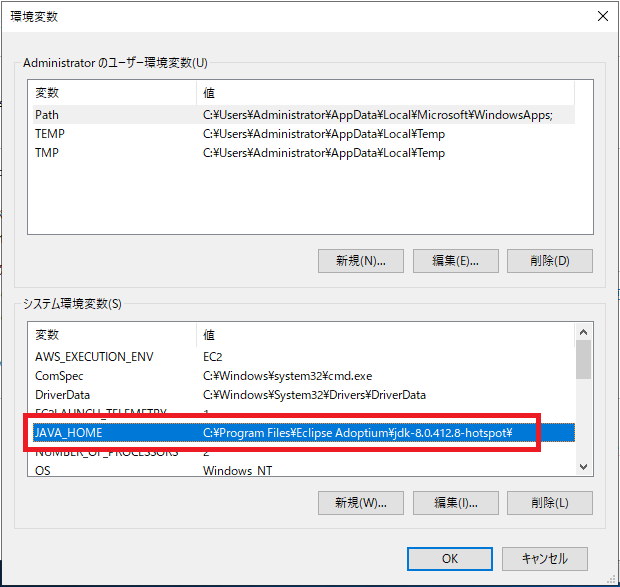
外部テーブルを使用する場合は、Java(2023.1の場合は1.8~)を事前にインストールし、JAVA_HOME環境変数を設定するだけで、簡単に接続することが可能です。

※JAVA_HOME環境変数設定例:


外部テーブルの使用方法については、以下の記事で紹介しております。
レシピデータセットを外部テーブルで読み込み、組み込みPythonでLLMを使って分析する (Langchain + OpenAI)


こちらの記事では、外部テーブルで作成できる2種類のテーブル(「CSVファイル直接接続」と「外部DBへのJDBCゲートウェイ経由での接続」)の簡単なサンプル作成例と、外部テーブルの特徴を紹介しています。
 

1-1. 簡単なサンプル作成例(CSVファイル編:ファイルから外部テーブル作成)


a. 外部データラッパとする CSVファイルを用意します(例:C:\temp\FT\managers.csv)

 ※サンプルCSV(managers.csv)

ID,Name,Title,HireDate,CompanyCar
111,"Cornish,Irving",Senior Support Manager,1992-02-10,6
222,"Aquino,Aric","Manager, Technical Account Management",1992-07-15,3
333,"Masterson,Arthur","Director, Customer Support",2002-10-01,9
444,"Deyn,Ernest",Director Customer Support,2000-08-15,4
555,"Lee,Eileen","Manager, Product Support",2002-06-17,3
666,"Knapp,Ashtyn",Senior Support Manager,2002-10-01,11
777,"King,Michael",Senior Support Manager,2003-04-10,2


b. 外部サーバ(WRC.Files)を作成します

CREATE FOREIGN SERVER WRC.Files FOREIGN DATA WRAPPER CSV HOST 'C:\temp\FT\'


c. 外部テーブルを作成します

CREATE FOREIGN TABLE WRC.Managers (
  ID INTEGER, 
  Name VARCHAR, 
  Title VARCHAR, 
  HireDate DATE
) SERVER WRC.Files FILE 'managers.csv' USING
{ "from" : {
       "file" : {
          "header": 1
       }
   }
}


1-2. 簡単なサンプル作成例(JDBCゲートウェイ接続経由編)


a. 外部DBへの JDBCゲートウェイ接続を作成します
 管理ポータル:
 [システム管理] > [構成] > [接続性] > [SQLゲートウェイ接続] 新規作成:WRC


b. 接続用の外部サービス(例:WRC.Data)を作成します。  

CREATE FOREIGN SERVER WRC.Data FOREIGN DATA WRAPPER JDBC CONNECTION 'WRC'


c. 外部サーバ内の任意のテーブルに対して外部テーブルを作成します。
  ※外部テーブルは CREATE FOREIGN TABLE コマンドで定義する必要があります。
   クラス定義を作成して外部テーブルを作成することはできません。

CREATE FOREIGN TABLE Remote.Problems SERVER WRC.Data TABLE 'SQLUser.Problem'


d. 作成後、クエリを実行します。

SELECT ProblemOwner, OpenDate FROM Remote.Problems WHERE OpenDate = '2023-03-09'

外部言語サーバ(%Java Server)が起動されていない状態でクエリを実行すると、以下のようなエラーが返ります。

SQLCODE: <-230>:<Foreign table query Execute() failed>]
  [%msg: <Foreign Tables - ERROR #5023: Remote Gateway Error: Connection cannot be established>]


2. 外部テーブルの特徴

・外部テーブルとのJoinが可能

・ローカルテーブルとのJoinが可能

・外部テーブル用に作成されるクラスは非表示となる(SQLテーブルとしては表示可能)

・削除する場合は、DROP FOREIGN TABLE コマンドで行う(%MANAGE_FOREIGN_SERVER 管理特権が必要)
 例:DROP FOREIGN TABLE WRC.Advisor

・外部テーブルに対してクエリを実行すると、クエリごとにすべてのフィールドが取得される

・ストリーム(Stream)フィールドの取得方法は、リンクテーブルと同様に substring 関数 を使用可能

例:

select substring(clob1,1,50) from linked.newclass1


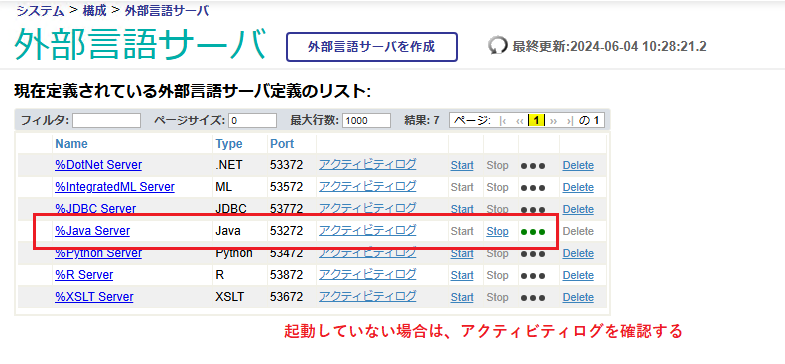
※うまく動作しない場合は、%Java Server が問題なく起動できているかご確認ください。
 [システム管理] > [構成] > [接続性] >[外部言語サーバ]  
 %Java Server が Start されているか


外部テーブルの詳細については、以下のドキュメントをご覧ください。
外部テーブル


※SQLゲートウェイ/リンクテーブルの使用方法については、以下のような記事をご紹介しております。

(管理ポータルで行う)リンクテーブルをプログラムで行う方法
SQL ゲートウェイを使用した外部データベースへのアクセス方法について
プログラムでSQLゲートウェイ接続設定を作成する方法

ディスカッション (0)0
続けるにはログインするか新規登録を行ってください