Node.jsからIRISのクラスを呼び出してみた
開発者の皆さん、はじめまして!
普段はサーバーレス環境での開発をしていて、AWS Lambda を使ったアプリケーション構築を主に行っています。IRIS についての実装経験はまだ浅いのですが、その高速で柔軟なデータベース機能の素晴らしさはよく知っています。
「このパワフルな IRIS を、使い慣れたサーバーレスアプリから呼び出せたらいいのにな...」
そんな思いから、今回 AWS Lambda と IRIS Native API を組み合わせた実装に挑戦してみました。これを通して、IRIS のことをもっと好きになれたらいいなと思っています。まだ IRIS の実装経験が浅いため、もっと良いアプローチや最適な方法があるかもしれません。もし改善点や間違いがあれば、ぜひコメントで教えていただけると嬉しいです!
この記事では、AWS Lambda から IRIS Native API を使用してデータを取得する方法を実装例とともに解説します。この基本実装をベースに、S3 トリガーや他の AWS サービスとの連携も可能です。ぜひ最後までお付き合いいただけると嬉しいです!
前提条件
- Node.js / TypeScript の基本的な知識
- AWS Lambda の基礎知識。
AWS環境の構成イメージ
今回扱う実装は、以下のような AWS 環境での利用を想定しています。
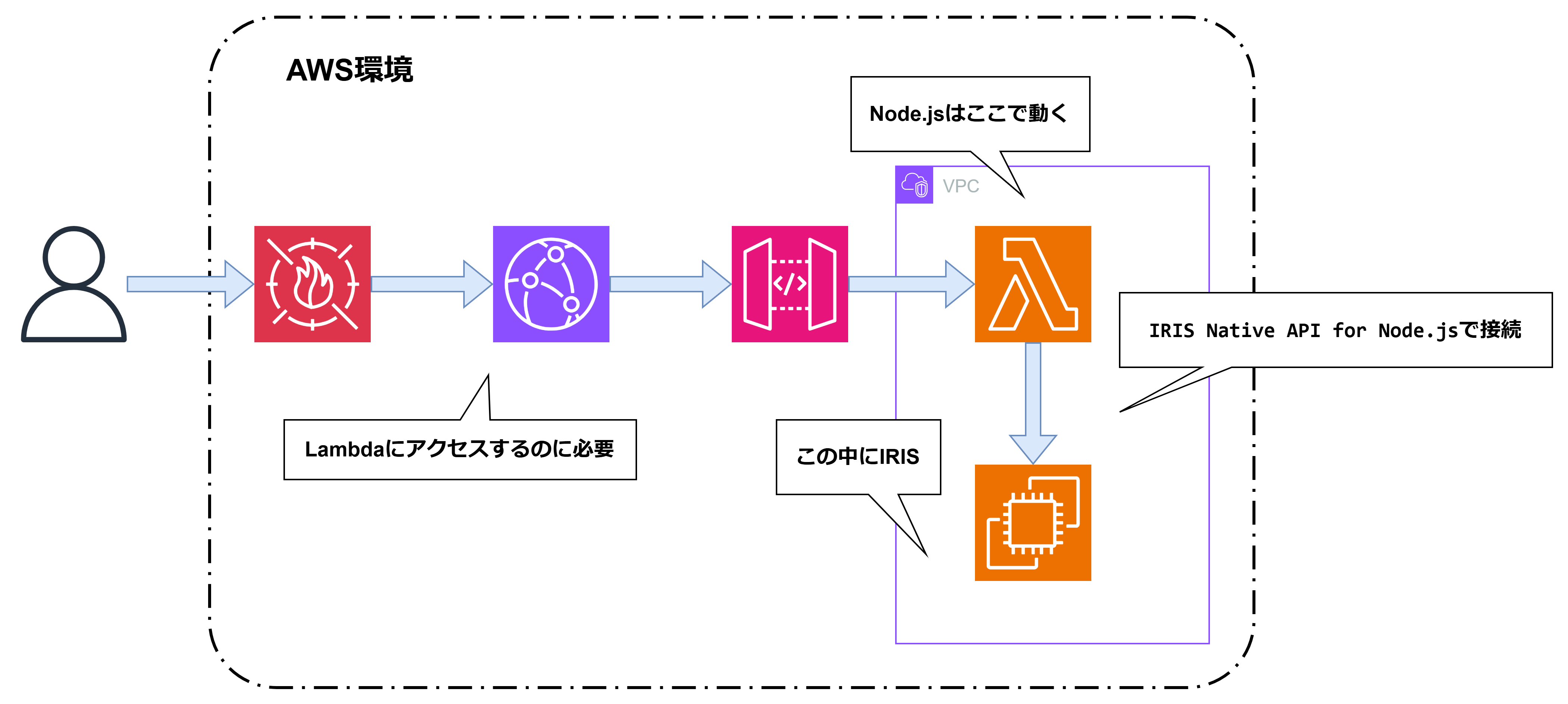
図のように、AWS 環境内で以下のような構成が可能です:
- ユーザーからのリクエスト → WAF → CloudFront → API Gateway → Lambda → EC2(IRIS)
- Lambda 関数:VPC 内で Node.js ランタイムとして動作し、IRIS Native API for Node.js を使用して IRIS に接続
- IRIS:同じ VPC 内に配置され、Lambda から Native API 経由でアクセス可能
この基本構成をベースに、ユースケースに合わせてカスタマイズするようなイメージです。
IRIS Native API for Node.js の基本接続
Node.jsからInterSystems IRIS に接続するために、公式のネイティブドライバー @intersystems/intersystems-iris-native を使用します。
使い方については、InterSystems 公式ドキュメント を参考にしました。
パッケージのインストール
npm install @intersystems/intersystems-iris-native
接続の実装
接続情報は環境変数などで管理し、createConnection メソッドで接続を確立します。
(AWS Secrets Managerなどで管理するのが望ましいです。)
import irisnative from '@intersystems/intersystems-iris-native';

// 接続設定のインターフェース
interface IrisConfig {
  host: string;
  port: number;
  namespace: string;
  username: string;
  password: string;
}

// 接続の確立
function connectToIris(config: IrisConfig) {
  const connection = irisnative.createConnection({
    host: config.host,
    port: config.port,
    ns: config.namespace,
    user: config.username,
    pwd: config.password,
  });

  // IRIS オブジェクトの作成(これを通じて操作を行います)
  const iris = connection.createIris();

  return { connection, iris };
}
IRIS 側のクラス実装 (ObjectScript)
Node.js から呼び出される IRIS 側のクラスメソッドを定義します。ここでは、指定されたグローバル変数のデータを走査し、JSON 形式で返すメソッドの例を示します。 JSON 形式でデータを返すことで、Node.js 側でのデータ扱いが容易になります。
Class User.TEMPAPI Extends %Persistent
{

/// テストとして指定されたグローバル変数の先頭10件を JSON 文字列として返す
/// globalName: グローバル名(例: "MyGlobal")
ClassMethod GetSampleDataJSON(globalName As %String) As %String
{
    Set base = "^"_globalName
    Set out = ##class(%DynamicArray).%New()

    // グローバル変数を $QUERY で走査
    Set ref = base
    For i=1:1:10 {
        Set ref = $QUERY(@ref)
        Quit:ref=""

        // データを取得して JSON オブジェクトに追加
        Set val = $GET(@ref)
        Set item = ##class(%DynamicObject).%New()
        Do item.%Set("key", $QSUBSCRIPT(ref, $QLENGTH(ref)))
        Do item.%Set("value", val)
        Do out.%Push(item)
    }

    // JSON 文字列として返却
    Return out.%ToJSON()
}

}
Node.js から IRIS クラスメソッドの呼び出し
classMethodString を使用して、IRIS 側のメソッドを呼び出し、結果(JSON文字列)を受け取ります。
実装例:グローバルデータの取得
実際のデータ取得を行うロジックの実装例です。classMethodString を使用し、タイムアウト処理を追加してより堅牢な実装にしています。
async function fetchSampleData(iris: any, tableName: string) {
  const className = 'User.TEMPAPI';
  const methodName = 'GetSampleDataJSON';

  return new Promise((resolve, reject) => {
    // 10秒のタイムアウトを設定
    const timeout = setTimeout(() => {
      reject(new Error('IRIS呼び出しタイムアウト (10秒)'));
    }, 10000);

    try {
      console.log(`IRISメソッド呼び出し: ${className}.${methodName}(${tableName})`);

      // クラスメソッドを実行し、JSON 文字列を取得
      // 引数: クラス名, メソッド名, 引数1(globalName)
      const jsonStr = iris.classMethodString(className, methodName, tableName);
      clearTimeout(timeout);
      console.log('IRISレスポンス受信完了');

      // JSON をパース
      const result = JSON.parse(jsonStr);
      console.log('JSONパース完了');
      resolve(result);
    } catch (error) {
      clearTimeout(timeout);
      console.error('データ取得エラー:', error);
      reject(error);
    }
  });
}
IRISのクラスを実行するためのプログラムとしてはこれだけです!
Lambda ハンドラーの実装
Lambda 関数として動作させるためのハンドラーを TypeScript で実装します。
src/app.ts
import { APIGatewayProxyEvent, APIGatewayProxyResult } from 'aws-lambda';
import irisnative from '@intersystems/intersystems-iris-native';

interface IrisConfig {
  host: string;
  port: number;
  namespace: string;
  username: string;
  password: string;
}

// IRIS接続(グローバルスコープでキャッシュ)
let cachedConnection: any = null;
let cachedIris: any = null;

// IRIS接続の初期化
function connectToIris(config: IrisConfig) {
  if (!cachedConnection) {
    cachedConnection = irisnative.createConnection({
      host: config.host,
      port: config.port,
      ns: config.namespace,
      user: config.username,
      pwd: config.password,
    });
    cachedIris = cachedConnection.createIris();
    console.log('IRIS接続を初期化しました');
  }
  return cachedIris;
}

// データ取得処理
async function fetchSampleData(iris: any, tableName: string): Promise<any[]> {
  const className = 'User.TEMPAPI';
  const methodName = 'GetSampleDataJSON';

  return new Promise((resolve, reject) => {
    const timeout = setTimeout(() => {
      reject(new Error('IRIS呼び出しタイムアウト (10秒)'));
    }, 10000);

    try {
      console.log(`IRISメソッド呼び出し: ${className}.${methodName}(${tableName})`);
      const jsonStr = iris.classMethodString(className, methodName, tableName);
      clearTimeout(timeout);

      const result = JSON.parse(jsonStr);
      resolve(result);
    } catch (error) {
      clearTimeout(timeout);
      console.error('データ取得エラー:', error);
      reject(error);
    }
  });
}

// Lambda ハンドラー
export const handler = async (event: APIGatewayProxyEvent): Promise<APIGatewayProxyResult> => {
  try {
    const config: IrisConfig = {
      host: process.env.IRIS_HOST!,
      port: parseInt(process.env.IRIS_PORT || '51773'),
      namespace: process.env.IRIS_NAMESPACE || 'USER',
      username: process.env.IRIS_USERNAME!,
      password: process.env.IRIS_PASSWORD!,
    };

    const iris = connectToIris(config);

    // クエリパラメータから table を取得
    const tableName = event.queryStringParameters?.table || 'TEMP';
    console.log(`テーブル名: ${tableName}`);

    // データ取得
    const result = await fetchSampleData(iris, tableName);

    return {
      statusCode: 200,
      headers: {
        'Content-Type': 'application/json',
        'Access-Control-Allow-Origin': '*',
      },
      body: JSON.stringify({
        success: true,
        data: result,
        count: result.length,
      }),
    };
  } catch (error) {
    console.error('エラー:', error);
    return {
      statusCode: 500,
      headers: {
        'Content-Type': 'application/json',
      },
      body: JSON.stringify({
        error: 'Internal Server Error',
        message: error instanceof Error ? error.message : String(error),
        stack: error instanceof Error ? error.stack : undefined,
      }),
    };
  }
};
package.json
{
  "name": "temp-temp",
  "version": "1.0.0",
  "description": "InterSystems IRIS Native API sample",
  "scripts": {
    "build": "tsc",
    "clean": "rm -rf dist"
  },
  "dependencies": {
    "@intersystems/intersystems-iris-native": "^2.0.2"
  },
  "devDependencies": {
    "@types/aws-lambda": "^8.10.145",
    "@types/express": "^4.17.13",
    "@types/node": "^18.0.0",
    "typescript": "^5.0.0"
  }
}
ビルド
以下のコマンドでビルドするとlambda-package.zip が生成されます。
docker build -f Dockerfile.build -t lambda-iris-builder .
docker run --rm -v ${PWD}/output:/output lambda-iris-builder
Lambda にアップロード後、ハンドラーを dist/app.handler に設定し、環境変数(IRIS_HOST, IRIS_PORT, IRIS_NAMESPACE, IRIS_USERNAME, IRIS_PASSWORD)を設定します。
Dockerfile.build:
# Lambda用のZIPパッケージをビルドするための一時イメージ
FROM public.ecr.aws/lambda/nodejs:20 AS builder

WORKDIR /build

# package.jsonをコピーして依存関係をインストール
COPY package*.json ./
RUN npm install --no-audit --no-fund --production

# 不要なプラットフォーム用のバイナリを削除(サイズ削減)
# Amazon Linux 2023 (x64) では lnxubuntu2204x64 のみ必要
RUN cd /build/node_modules/@intersystems/intersystems-iris-native/bin && \
    echo "削除前:" && du -sh . && \
    rm -rf dockerubuntuarm64 dockerubuntux64 lnxrh10arm64 lnxrh10x64 lnxrh8x64 lnxrh9arm64 lnxrh9x64 lnxrharm64 lnxsuse15x64 lnxubuntu2204arm64 lnxubuntu2404arm64 lnxubuntu2404x64 macos macx64 winx64 winx86 && \
    echo "削除後:" && du -sh . && \
    ln -s lnxubuntu2204x64 lnxrhx64

# ソースコードをコピーしてビルド
COPY src ./src
COPY tsconfig.json ./
RUN npm install typescript && \
    npx tsc

# zipツールをインストールしてパッケージを作成
FROM ubuntu:22.04
RUN apt-get update && apt-get install -y zip && rm -rf /var/lib/apt/lists/*

WORKDIR /package
COPY --from=builder /build/dist ./dist
COPY --from=builder /build/node_modules ./node_modules
COPY --from=builder /build/package.json ./package.json

# ZIPファイルを作成
RUN zip -r /lambda-package.zip .

CMD ["cp", "/lambda-package.zip", "/output/"]
重要なポイント
ビルド時に詰まったポイントを書いておきます。(もっといい方法があるのかもしれないです><)
1. パッケージサイズの最適化
IRIS Native API には複数のプラットフォーム用のバイナリが含まれています。Lambda では Amazon Linux 2023 (x64) のみで動作するため、不要なプラットフォーム用のバイナリを削除することで、パッケージサイズを大幅に削減できます。
RUN cd node_modules/@intersystems/intersystems-iris-native/bin && \
    rm -rf dockerubuntuarm64 dockerubuntux64 lnxrh10arm64 lnxrh10x64 \
           lnxrh8x64 lnxrh9arm64 lnxrh9x64 lnxrharm64 lnxsuse15x64 \
           lnxubuntu2204arm64 lnxubuntu2404arm64 lnxubuntu2404x64 \
           macos macx64 winx64 winx86
2. シンボリックリンクの作成(必須)
Amazon Linux 環境では IRIS Native API が lnxrhx64 として検出されますが、実際のバイナリは lnxubuntu2204x64 ディレクトリに存在します。そのため、シンボリックリンクを作成してプラットフォーム検出の問題を解決します。
RUN ln -s lnxubuntu2204x64 lnxrhx64
実行例
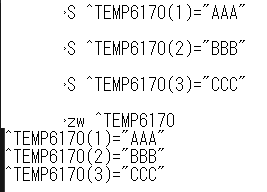
IRIS側のデータ
下記のグローバルの内容をLambdaから取得してみます。
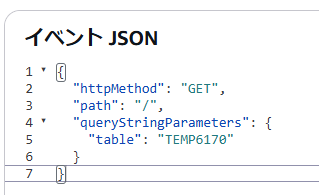
Lambda テストイベント
tableというパラメータで取得したいグローバルを渡します。
実行結果

まとめ
AWS Lambda 上で IRIS Native API for Node.js を使用した API の構築方法を紹介しました。 LambdaからIRISのクラスを呼び出すことができるようになることでAWSのイベント駆動型の仕組みとシームレスにIRISを連携でき、サーバーレスアーキテクチャで IRIS を最大限活用できます!
この記事の内容が皆様の開発の参考になれば幸いです。
あとがき
実は当初、Node.js から IRIS のグローバル変数に直接アクセスしてデータを取得する方法を試していました。しかし、1件取得するのに約 0.003 秒かかり、1000 件取得すると約 3 秒かかってしまうことがわかりました。リアルタイム性が求められる API としては、実運用に耐えられないと判断しました。
そのため、今回の記事で紹介したように、IRIS 側でクラスメソッドを実装し、そこでデータをまとめて取得して JSON 形式で返す方式に切り替えました。この方法により、大幅にパフォーマンスを改善できました。
とはいえ、ネットワーク越しに 1 件 1 件データを取得して 0.003 秒というのは、実はかなり高速なんですけどね!IRIS の処理速度の速さを実感できた瞬間でもありました。
付録:ソースコード全文
実装の参考にしていただけるよう、プログラムの全文を掲載します。
src/app.ts
import { APIGatewayProxyEvent, APIGatewayProxyResult } from 'aws-lambda';
import irisnative from '@intersystems/intersystems-iris-native';

interface IrisConfig {
  host: string;
  port: number;
  namespace: string;
  username: string;
  password: string;
}

let cachedConnection: any = null;
let cachedIris: any = null;

function connectToIris(config: IrisConfig) {
  console.log('IRIS接続中...');
  const connection = irisnative.createConnection({
    host: config.host,
    port: config.port,
    ns: config.namespace,
    user: config.username,
    pwd: config.password,
  });

  const iris = connection.createIris();
  console.log('IRIS接続完了');

  return { connection, iris };
}

async function fetchSampleData(iris: any, tableName: string) {
  const className = 'User.TEMPAPI';
  const methodName = 'GetSampleDataJSON';

  return new Promise((resolve, reject) => {
    const timeout = setTimeout(() => {
      reject(new Error('IRIS呼び出しタイムアウト (10秒)'));
    }, 10000);

    try {
      console.log(`IRISメソッド呼び出し: ${className}.${methodName}(${tableName})`);
      const jsonStr = iris.classMethodString(className, methodName, tableName);
      clearTimeout(timeout);
      console.log('IRISレスポンス受信完了');

      const result = JSON.parse(jsonStr);
      console.log('JSONパース完了');
      resolve(result);
    } catch (error) {
      clearTimeout(timeout);
      console.error('データ取得エラー:', error);
      reject(error);
    }
  });
}

async function executeLogic(tableName: string) {
  const config = {
    host: process.env.IRIS_HOST!,
    port: parseInt(process.env.IRIS_PORT!, 10),
    namespace: process.env.IRIS_NAMESPACE!,
    username: process.env.IRIS_USERNAME!,
    password: process.env.IRIS_PASSWORD!,
  };

  try {
    if (!cachedConnection) {
      const result = connectToIris(config);
      cachedConnection = result.connection;
      cachedIris = result.iris;
    } else {
      console.log('キャッシュされた接続を再利用');
    }

    console.log(`データ取得開始: ${tableName}`);
    const result = await fetchSampleData(cachedIris, tableName);
    console.log('データ取得成功 : ' + JSON.stringify(result));
    return result;

  } catch (error) {
    console.error('エラー:', error);

    if (cachedConnection) {
      try {
        cachedConnection.close();
      } catch (closeError) {
        console.error('接続クローズ失敗:', closeError);
      }
      cachedConnection = null;
      cachedIris = null;
    }
    throw error;
  }
}

export const handler = async (event: APIGatewayProxyEvent): Promise<APIGatewayProxyResult> => {
  try {
    console.log(`${event.httpMethod} ${event.path}`);

    const tableName = event.queryStringParameters?.table || 'TEMP';
    console.log(`テーブル名: ${tableName}`);

    const result = await executeLogic(tableName);
    console.log('処理完了');

    return {
      statusCode: 200,
      body: JSON.stringify(result),
      headers: {
        'Content-Type': 'application/json',
        'Access-Control-Allow-Origin': '*',
      },
    };
  } catch (error) {
    console.error('ハンドラーエラー:', error);
    console.error('エラースタック:', error instanceof Error ? error.stack : 'N/A');
    return {
      statusCode: 500,
      body: JSON.stringify({
        error: 'Internal Server Error',
        message: error instanceof Error ? error.message : String(error),
        stack: error instanceof Error ? error.stack : undefined,
      }),
    };
  }
};
Dockerfile.build
# Lambda用のZIPパッケージをビルドするための一時イメージ
FROM public.ecr.aws/lambda/nodejs:20 AS builder

WORKDIR /build

# package.jsonをコピーして依存関係をインストール
COPY package*.json ./
RUN npm install --no-audit --no-fund --production

# 不要なプラットフォーム用のバイナリを削除(サイズ削減)
# Amazon Linux 2023 (x64) では lnxubuntu2204x64 のみ必要
RUN cd /build/node_modules/@intersystems/intersystems-iris-native/bin && \
    echo "削除前:" && du -sh . && \
    rm -rf dockerubuntuarm64 dockerubuntux64 lnxrh10arm64 lnxrh10x64 lnxrh8x64 lnxrh9arm64 lnxrh9x64 lnxrharm64 lnxsuse15x64 lnxubuntu2204arm64 lnxubuntu2404arm64 lnxubuntu2404x64 macos macx64 winx64 winx86 && \
    echo "削除後:" && du -sh . && \
    ln -s lnxubuntu2204x64 lnxrhx64

# ソースコードをコピーしてビルド
COPY src ./src
COPY tsconfig.json ./
RUN npm install typescript && \
    npx tsc

# zipツールをインストールしてパッケージを作成
FROM ubuntu:22.04
RUN apt-get update && apt-get install -y zip && rm -rf /var/lib/apt/lists/*

WORKDIR /package
COPY --from=builder /build/dist ./dist
COPY --from=builder /build/node_modules ./node_modules
COPY --from=builder /build/package.json ./package.json

# ZIPファイルを作成
RUN zip -r /lambda-package.zip .

CMD ["cp", "/lambda-package.zip", "/output/"]
User.TEMPAPI
Class User.TEMPAPI Extends %Persistent
{

/// テストとして指定されたグローバル変数の先頭10件を JSON 文字列として返す
/// globalName: グローバル名(例: "MyGlobal")
ClassMethod GetSampleDataJSON(globalName As %String) As %String
{
    Set base = "^"_globalName
    Set out = ##class(%DynamicArray).%New()

    // グローバル変数を $QUERY で走査
    Set ref = base
    For i=1:1:10 {
        Set ref = $QUERY(@ref)
        Quit:ref=""

        // データを取得して JSON オブジェクトに追加
        Set val = $GET(@ref)
        Set item = ##class(%DynamicObject).%New()
        Do item.%Set("key", $QSUBSCRIPT(ref, $QLENGTH(ref)))
        Do item.%Set("value", val)
        Do out.%Push(item)
    }

    // JSON 文字列として返却
    Return out.%ToJSON()
}

}