投稿者

Training Sales Engineer at InterSystems Japan
記事 Mihoko Iijima · 4月 13, 2022 11m read

Store Mindmaps using Globals(InterSystems Global コンテスト優勝作品紹介)
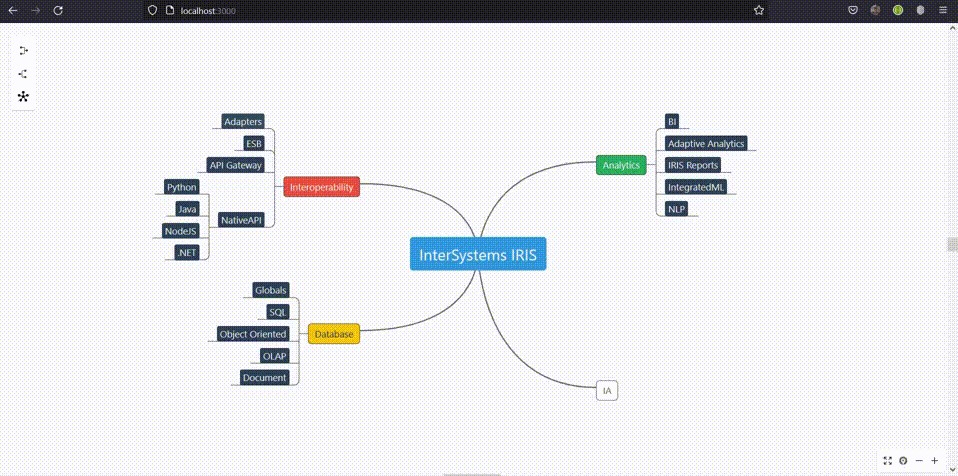
  

開発者の皆さん、こんにちは!

この記事では、InterSystems Global コンテストで見事優勝🏆された @Yuri Marx さんの作品をご紹介します!(ご本人が投稿された記事を使ってご紹介しますlaugh

InterSystems IRIS の「Global」はデータベースに格納される変数で、キーバリュー形式でアクセスできます。キーが複数ある場合は、配列の添え字を利用して階層のようなイメージで格納することもできます。

ここでご紹介する優勝作品は、配列をうまく利用した作品で、MindMapで書いた情報そのまま(見たまま)をグローバルに登録しています。

MindMapの表示部分については、オープンソースの Mind-elixir を使用されているようです。

ソースコードは OpenExchange で公開中で、git clone 後、 docker-compose up -d --build したらすぐ動きます!(docker 🐳ほんとに便利ですね!)

また、ご本人の解説ビデオも YouTube で絶賛公開中です!お手元で動かさなくてもどんな感じで Global が使われているか、どんな感じで Web アプリを作成されているのかを確認できますので、ぜひご覧ください!

Global の登録内容は 2:26秒辺りから、フロントエンドの解説は 3:11 辺りから


以下、Yuri さんが投稿された記事の内容です。


Global は、データを永続化する InterSystems IRIS のコアとなるものです。柔軟性があり、JSON ドキュメント、リレーショナル・データ、オブジェクト指向データ、OLAP キューブ、および Mindmaps のようなカスタム・データ・モデルを保存できます。

グローバルを使用してMindMp データを保存、削除、取得する方法については、以下の手順をご参照ください。

docker/docker-compose/git がインストールされている環境でお試しください。

1. サンプルコードをローカルに clone/pull する手順は以下の通りです。

$ git clone https://github.com/yurimarx/global-mindmap.git

2. clone後、作成されたディレクトリに移動し、ターミナルで以下実行し、イメージをビルドします。

$ docker-compose build

3. 以下のコマンドを実行し、コンテナを開始します。

$ docker-compose up -d

4. Mindmap フロントエンドを開き、👆に貼っているGIFアニメのように動かす場合は http://localhost:3000 にアクセスします(または、http://localhost:52773/mindmap/index.html を開きます)。


ソースコードについての解説

保存するデータの構造は以下の通りです (詳細はこちらをご覧ください: https://www.npmjs.com/package/mind-elixir):

{
  topic: 'node topic',
  id: 'bd1c24420cd2c2f5',
  style: { fontSize: '32', color: '#3298db', background: '#ecf0f1' },
  parent: null,
  tags: ['Tag'],
  icons: ['😀'],
  hyperLink: 'https://github.com/ssshooter/mind-elixir-core',
}

parent プロパティは、MindMap のノード間に親子関係を構築するために使用されます。

^mindmap グローバルに登録する部分のソースコード


ClassMethod StoreMindmapNode

/// Store mindmap node
ClassMethod StoreMindmapNode() As %Status
{
    Try {
     
      Set data = {}.%FromJSON(%request.Content)
     
      Set ^mindmap(data.id) = data.id /// set mindmap key
      Set ^mindmap(data.id, "topic") = data.topic /// set topic subscript
      Set ^mindmap(data.id, "style", "fontSize") = data.style.fontSize /// set style properties subscripts
      Set ^mindmap(data.id, "style", "color") = data.style.color
      Set ^mindmap(data.id, "style", "background") = data.style.background
      Set ^mindmap(data.id, "parent") = data.parent /// store parent id subscript
      Set ^mindmap(data.id, "tags") = data.tags.%ToJSON() /// store tags subscript
      Set ^mindmap(data.id, "icons") = data.icons.%ToJSON() /// store icons subscript
      Set ^mindmap(data.id, "hyperLink") = data.hyperLink /// store hyperLink subscript
     
      Set %response.Status = 200
      Set %response.Headers("Access-Control-Allow-Origin")="*"
      Write "Saved"
      Return $$$OK
    } Catch err {
      write !, "Error name: ", ?20, err.Name,
          !, "Error code: ", ?20, err.Code,
          !, "Error location: ", ?20, err.Location,
          !, "Additional data: ", ?20, err.Data, !
      Return $$$NOTOK
  }
}

^mindmap グローバルを作成しています。mindmap のプロパティについては、Global の添え字に設定しています。添え字のキーは mindmap の id プロパティの値を設定しています。 


^mindmap ノードを削除するサンプルコード: Global の kill (削除)


ClassMethod DeleteMindmapNode

/// Delete mindmap node
ClassMethod DeleteMindmapNode(id As %String) As %Status
{
    Try {
     
      Kill ^mindmap(id) /// delete selected mindmap node using the id (global key)
     
      Set %response.Status = 200
      Set %response.Headers("Access-Control-Allow-Origin")="*"
      Write "Deleted"
      Return $$$OK
    } Catch err {
      write !, "Error name: ", ?20, err.Name,
          !, "Error code: ", ?20, err.Code,
          !, "Error location: ", ?20, err.Location,
          !, "Additional data: ", ?20, err.Data, !
      Return $$$NOTOK
  }
}

このサンプルでは、minamap.id  を ^mindmap グローバルのキーとして利用しているので削除は簡単です。以下実行するだけです。

kill ^mindmap(<mindmap id>)


全格納情報を取得するコード例 - $ORDER()関数を使用してGlobal をループする


ClassMethod GetMindmap - return all mindmap global nodes

/// Get mindmap content
ClassMethod GetMindmap() As %Status
{
    Try {
     
      Set Nodes = []


      Set Key = $Order(^mindmap("")) /// get the first mindmap node stored - the root
      Set Row = 0
     
      While (Key '= "") { /// while get child mindmap nodes
        Do Nodes.%Push({}) /// create a item into result
        Set Nodes.%Get(Row).style = {}
        Set Nodes.%Get(Row).id = Key /// return the id property
        Set Nodes.%Get(Row).hyperLink = ^mindmap(Key,"hyperLink") /// return the hyperlink property
        Set Nodes.%Get(Row).icons = ^mindmap(Key,"icons") /// return icons property
        Set Nodes.%Get(Row).parent = ^mindmap(Key,"parent") /// return parent id property
        Set Nodes.%Get(Row).style.background = ^mindmap(Key,"style", "background") /// return the style properties
        Set Nodes.%Get(Row).style.color = ^mindmap(Key,"style", "color")
        Set Nodes.%Get(Row).style.fontSize = ^mindmap(Key,"style", "fontSize")
        Set Nodes.%Get(Row).tags = ^mindmap(Key,"tags") /// return tags property
        Set Nodes.%Get(Row).topic = ^mindmap(Key,"topic") /// return topic property (title mindmap node)
        Set Row = Row + 1
       
        Set Key = $Order(^mindmap(Key)) /// get the key to the next mindmap global node
      }
     
      Set %response.Status = 200
      Set %response.Headers("Access-Control-Allow-Origin")="*"
      Write Nodes.%ToJSON()
      Return $$$OK
    } Catch err {
      write !, "Error name: ", ?20, err.Name,
          !, "Error code: ", ?20, err.Code,
          !, "Error location: ", ?20, err.Location,
          !, "Additional data: ", ?20, err.Data, !
      Return $$$NOTOK
  }
}

^mindmap グローバルの第1番目の添え字にある最初の情報(ルートノード)を取得するために、$Order(^mindmap("")) を実行しています(取得した内容は変数 Key に設定しています)。

^mindmap(Key, <property name>) を使用して、各プロパティ値を取得しています。次に登録されている Key を取得するため、While文の最後に  $Order(^mindmap(Key) を実行しています。


フロントエンド

MindMap のレンダリングと編集には Mind-elixir と React が使われ、IRIS で構築された API バックエンドを呼び出しています。詳細は、MindMap の react コンポーネントを参照してください。


Mindmap React component - consuming IRIS REST API

import React from "react";
import MindElixir, { E } from "mind-elixir";
import axios from 'axios';


class Mindmap extends React.Component {


    componentDidMount() {


        this.dynamicWidth = window.innerWidth;
        this.dynamicHeight = window.innerHeight;
       
            .then(res => {
                if (res.data == "1") {
                    axios.get(`http://localhost:52773/global-mindmap/get`)
                        .then(res2 => {
                            this.ME = new MindElixir({
                                el: "#map",
                                direction: MindElixir.LEFT,
                                data: this.renderExistentMindmap(res2.data),
                                draggable: true, // default true
                                contextMenu: true, // default true
                                toolBar: true, // default true
                                nodeMenu: true, // default true
                                keypress: true // default true
                            });
                            this.ME.bus.addListener('operation', operation => {
                                console.log(operation)
                   
                                if (operation.name == 'finishEdit' || operation.name == 'editStyle') {
                                    this.saveMindmapNode(operation.obj)
                                } else if (operation.name == 'removeNode') {
                                    this.deleteMindmapNode(operation.obj.id)
                                }
                            })
                            this.ME.init();
                        })
                   
                } else {
                    this.ME = new MindElixir({
                        el: "#map",
                        direction: MindElixir.LEFT,
                        data: MindElixir.new("New Mindmap"),
                        draggable: true, // default true
                        contextMenu: true, // default true
                        toolBar: true, // default true
                        nodeMenu: true, // default true
                        keypress: true // default true
                    });
                    this.ME.bus.addListener('operation', operation => {
                        console.log(operation)
           
                        if (operation.name == 'finishEdit' || operation.name == 'editStyle') {
                            this.saveMindmapNode(operation.obj)
                        } else if (operation.name == 'removeNode') {
                            this.deleteMindmapNode(operation.obj.id)
                        }
                    })
                    this.saveMindmapNode(this.ME.nodeData)
                    this.ME.init();
                }


            })


    }


    render() {
        return (
            <div id="map" style={{ height: window.innerHeight + 'px', width: '100%' }} />
        );
    }


    deleteMindmapNode(mindmapNodeId) {
        axios.delete(`http://localhost:52773/global-mindmap/delete/${mindmapNodeId}`)
            .then(res => {
                console.log(res);
                console.log(res.data);
            })
    }


    saveMindmapNode(node) {


        axios.post(`http://localhost:52773/global-mindmap/save`, {
            topic: (node.topic == undefined ? "" : node.topic),
            id: node.id,
            style: (node.style == undefined ? "" : node.style),
            parent: (node.parent == undefined ? "" : node.parent.id),
            tags: (node.tags == undefined ? [] : node.tags),
            icons: (node.icons == undefined ? [] : node.icons),
            hyperLink: (node.hyperLink == undefined ? "" : node.hyperLink)
        })
            .then(res => {
                console.log(res);
                console.log(res.data);
            })
    }


    renderExistentMindmap(data) {
       
        let root = data[0]


        let nodeData = {
            id: root.id,
            topic: root.topic,
            root: true,
            style: {
                background: root.style.background,
                color: root.style.color,
                fontSize: root.style.fontSize,
            },
            hyperLink: root.hyperLink,
            children: []
        }


        this.createTree(nodeData, data)


        return { nodeData }
    }


    createTree(nodeData, data) {
        for(let i = 1; i < data.length; i++) {
            if(data[i].parent == nodeData.id) {
                let newNode = {
                    id: data[i].id,
                    topic: data[i].topic,
                    root: false,
                    style: {
                        background: data[i].style.background,
                        color: data[i].style.color,
                        fontSize: data[i].style.fontSize,
                    },
                    hyperLink: data[i].hyperLink,
                    children: []
                }
                nodeData.children.push(newNode)
                this.createTree(newNode, data)
            }
        }
    }


}


export default Mindmap;

もし、このサンプルコードが気に入りましたら、InterSystems Global コンテストで私の作品に投票してください!

ありがとうございました。

元の記事へ さんが書いた @Yuri Marx