
新しい投稿

検索

記事
· 2025年3月3日 6m read

Exploiter InterSystems IRIS pour l'analyse des données de santé avec l'IA explicable et la recherche vectorielle

Introduction

Pour atteindre des performances optimisées en matière d'IA, une explicabilité robuste, une adaptabilité et une efficacité dans les solutions de santé, InterSystems IRIS sert de fondation centrale pour un projet au sein du cadre multi-agent x-rAI. Cet article offre une analyse approfondie de la manière dont InterSystems IRIS permet le développement d'une plateforme d'analyse de données de santé en temps réel, permettant des analyses avancées et des informations exploitables. La solution exploite les points forts d'InterSystems IRIS, notamment le SQL dynamique, les capacités natives de recherche vectorielle, la mise en cache distribuée (ECP) et l'interopérabilité FHIR. Cette approche innovante s'aligne directement sur les thèmes du concours « Utilisation du SQL dynamique et SQL intégré », « GenAI, recherche vectorielle » et « FHIR, DME », démontrant une application pratique d'InterSystems IRIS dans un contexte critique de santé.
ディスカッション (0)1
続けるにはログインするか新規登録を行ってください
記事
· 2025年3月3日 1m read

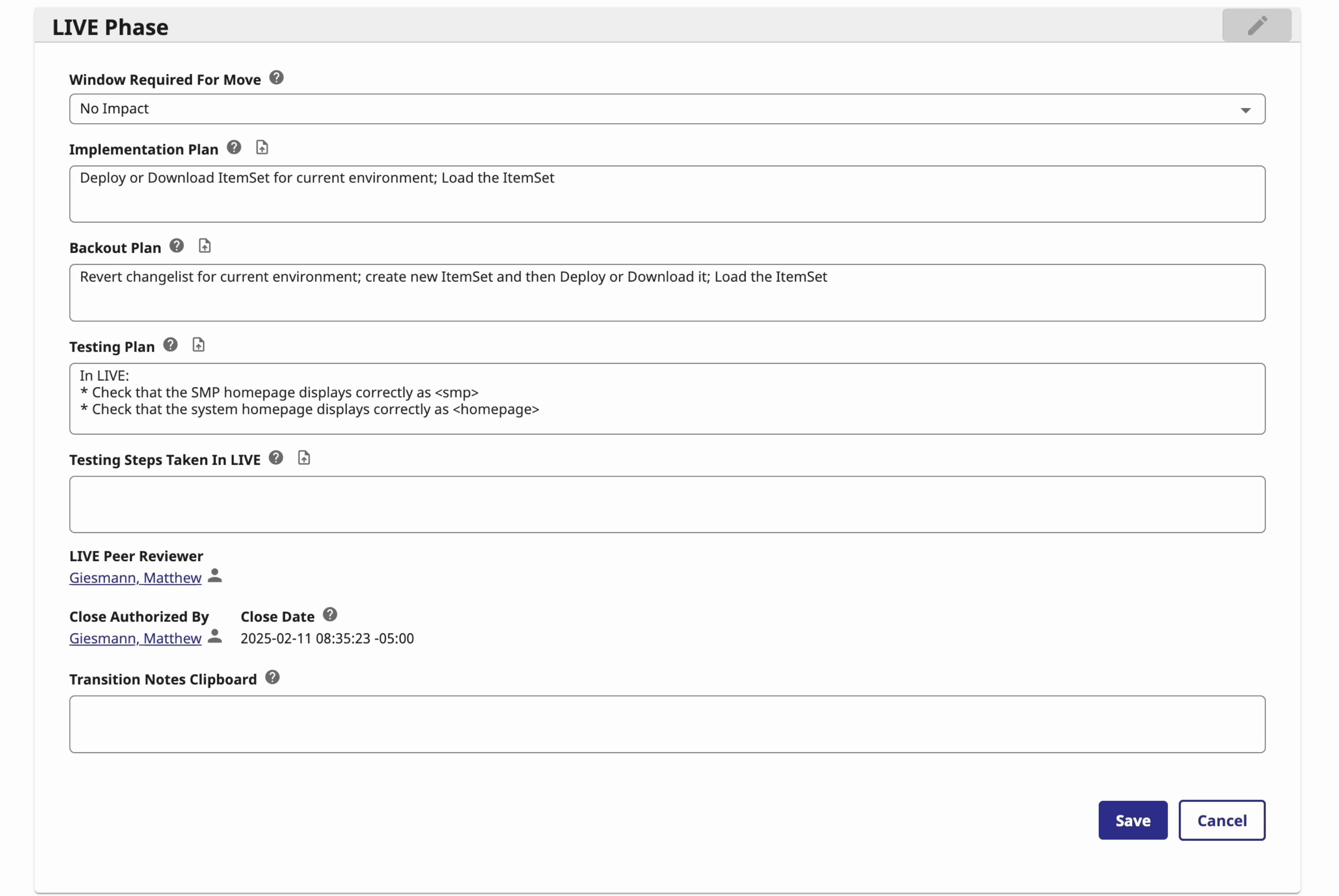
Nuevos tokens de reemplazo de enlaces en vivo dentro de los campos de texto de CCR: ¡conoced <smp> y <homepage>!

Los usuarios de CCR ahora pueden aprovechar una sintaxis mejorada para sustituir tokens predefinidos por enlaces URL en vivo dentro de los campos de texto relacionados con fases. Además del token existente <env>  , que se actualiza automáticamente para reflejar el entorno del registro CCR correspondiente, CCR introduce ahora dos nuevas palabras clave: <smp> y <homepage>.

El nuevo token <smp> se reemplaza automáticamente por la URL de la página de inicio del Portal de Gestión del sistema asociado al registro CCR en el entorno que haya recibido cambios más recientemente. Por ejemplo, si un registro CCR pertenece a un sistema BASE-TEST-LIVE y actualmente está en el entorno LIVE, usar <smp> dentro del campo de texto "Testing Plan" y hacer clic en el enlace generado os llevará al Portal de Gestión del entorno LIVE, ya que es donde el registro se encuentra en ese momento.

El nuevo token <homepage> funciona de manera similar a <smp>, pero en lugar de enlazar al Portal de Gestión, redirige a la página de inicio del sistema del registro CCR en el entorno correspondiente.

¡Ved estos cambios en acción en la breve demo a continuación!


ディスカッション (0)1
続けるにはログインするか新規登録を行ってください
ダイジェスト
· 2025年3月3日

Publicações Desenvolvedores InterSystems, Fevereiro 24 - Março 02, 2025, Resumo

Artigos
Perguntas
#InterSystems IRIS
#Caché
Fevereiro 24 - Março 02, 2025Week at a GlanceInterSystems Developer Community
質問
· 2025年3月3日

VS Code, compilation, line endings and git

The compile step in VS Code when using the InterSystems VS Code extensions appears to modify line endings in our class files when newly pulled from remote repo.

What steps can we take to stop this happening? / What settings can we modify?

We are doing local development with client side source control using git (BitBucket Cloud repository). We were previously using GitLab (locally hosted) and didn't have this issue. Developers are all on Windows machines, as are all the Ensemble instances. We believe we have autocrlf = true in all our local git configurations.

Steps to reproduce:

  • developer A makes a change, and commits the code to their local repo and then pushes it to BitBucket
  • developer B pulls the change - local copy shows with CRLF endings, as expected git status shows no local changes vs repo
  • developer B imports the changed class into Ensemble (right click, "Import" in VS Code) - local copy shows with CRLF endings, no changes vs repo
  • developer B compiles the changed class into Ensemble (right click, "Compile" in VS Code) - local copy shows as changed (source control tab in VS Code or git at command line), with LF endings
  • developer B can get the class to show as not changed by either reverting changes or by "git -add --renormalize CLASS"
1 Comment
ディスカッション (1)2
続けるにはログインするか新規登録を行ってください
ダイジェスト
· 2025年3月3日

InterSystems Developers Publications, Week February 24 - March 02, 2025, Digest

Articles
#InterSystems IRIS
Introducing UDP Adapter
By Corentin Blondeau
How Do You Display %Status Error in Terminal Or Let's Have a New Helpful Terminal Alias!
By Evgeny Shvarov
The Case for IRIS and JavaScript
By Rob Tweed
Avoid to use package named "code" with embedded python methods using [Language = python]
By Sylvain Guilbaud
Proposal for ObjectScript naming conventions and coding guidelines
By Robert Barbiaux
Leveraging InterSystems IRIS for Health Data Analytics with Explainable AI and Vector Search
By Rahul Singhal
IRIS Vector Search for Matching Companies and Climate Action
By Alice Heiman
Multi-Layered Security Architecture for IRIS Deployments on AWS with InterSystems IAM
By Roy Leonov
SQLAchemy-iris with the latest version Python driver
By Dmitry Maslennikov
Parallel Query Processing - (System-wide and Query-based)
By Parani.K
#Health Connect
#Caché
Announcements
#InterSystems IRIS
#InterSystems Ideas Portal
InterSystems Ideas News #19
By Irène Mykhailova
#Learning Portal
#Developer Community Official
#Other
#Open Exchange
Questions
#InterSystems IRIS
#Ensemble
#InterSystems IRIS for Health
#TrakCare
#Caché
#HealthShare
#Global Masters
February 24 - March 02, 2025Week at a GlanceInterSystems Developer Community