
新しい投稿

查找

記事
· 2025年3月13日 1m read

API Swagger para FHIR en InterSystems IRIS For Health

¡Hola colegas!

A menudo, durante el desarrollo de una aplicación frontend o cualquier otro tipo de comunicación vs API REST, vale la pena tener una Swagger UI - una interfaz de usuario de prueba para la API REST que sigue la especificación Open API 2.0. Por lo general es de gran ayuda, ya que permite, todo en uno, hacer pruebas manuales rápidas vs API REST, con sus respuestas y todos los datos.

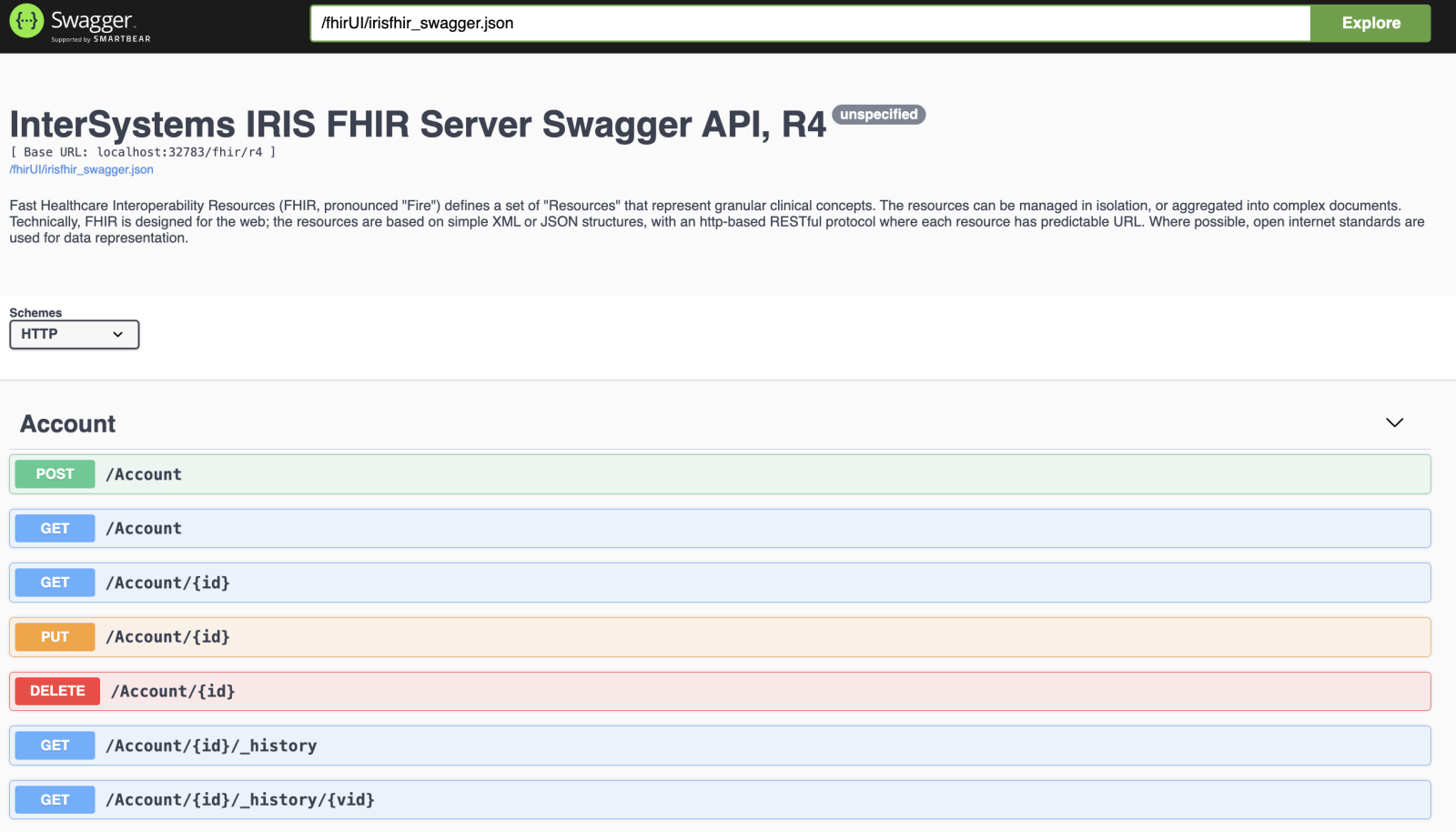
Recientemente he introducido el soporte Swagger en la plantilla InterSystems IRIS FHIR para la API FHIR R4:
¿Cómo hacerlo funcionar?

Aseguraos de tener docker instalado.

Clonad el repositorio:

git clone git@github.com:intersystems-community/iris-fhir-template.git

e iniciad:

docker compose up -d

Una vez que todo está construido abrid swagger en:

http://localhost:32783/swagger-ui/index.html

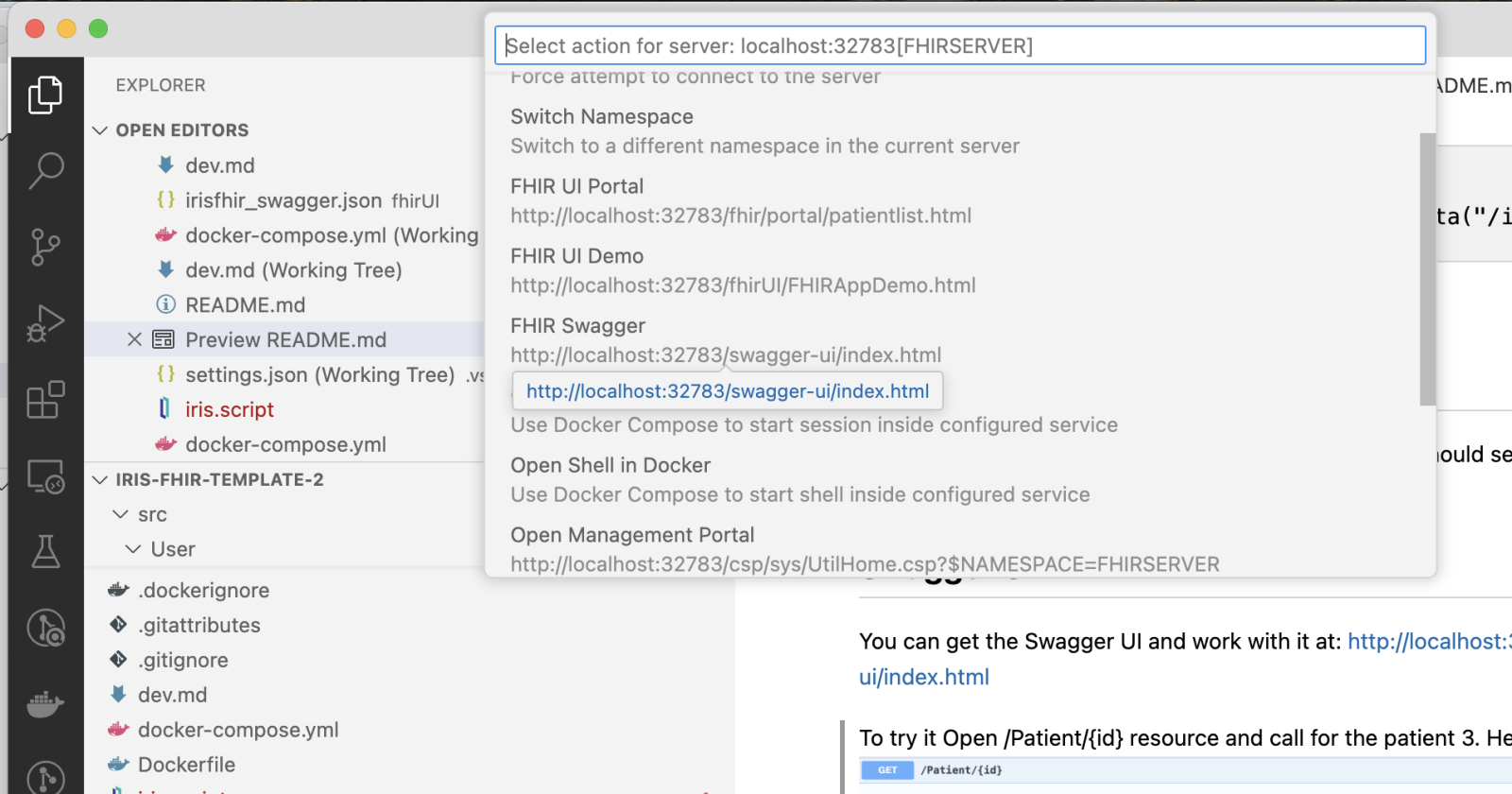
O si lo sacáis en VS Code, podéis abrirlo a través del menú InterSystems:
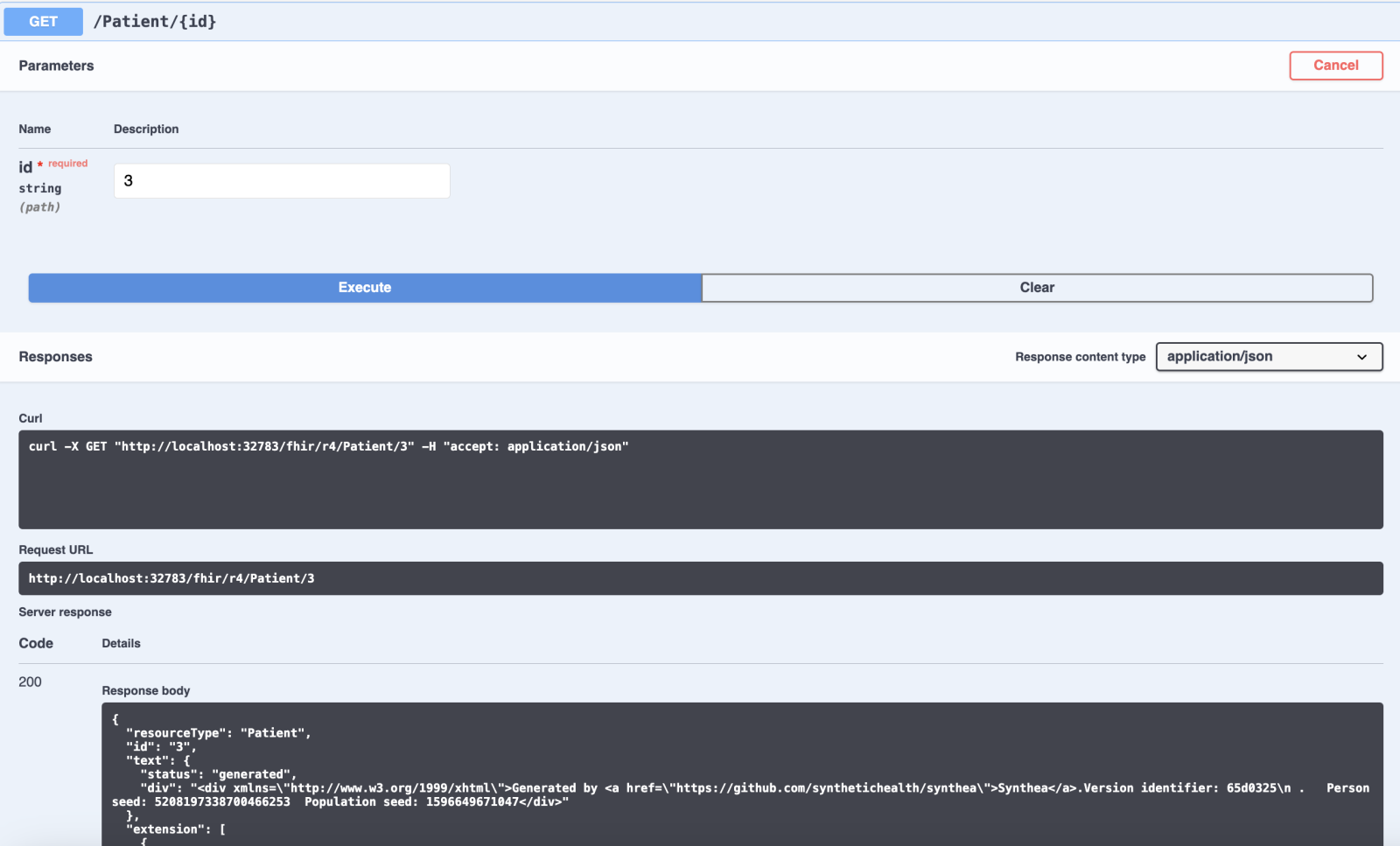
Para comprobarlo, por ejemplo, id a Entrada de pacientes y solicitad el id de paciente=3:
Espero que os guste. 

Agradecemos cualquier comentario, sugerencia o solicitud de ampliación.

ディスカッション (0)1
続けるにはログインするか新規登録を行ってください
InterSystems公式
· 2025年3月12日

早期アクセスプログラム「テーブル・パーティショニング機能」のご案内

InterSystems はこのたび「テーブル・パーティショニング機能」の早期アクセスプログラムを開始しました。これにより、IRIS をお使いのお客様が非常に大きなテーブルを管理したり、行データや関連インデックスをデータベースやストレージ階層間で分散できるようになります。テーブル・パーティショニングは IRIS のリレーショナル・データ管理の核心深くに関連する機能であるため、初期段階でのフィードバックを提供いただけたり、状況に応じて機能調整にご協力いただける、少数の熱心なお客様と一緒になって、確実な機能実装を進めたいと考えています。

非常に大規模なリレーショナル・データセットをご利用中で、より効率的な運用を望まれており、新機能を試してみたいというお客様は、ぜひ https://www.intersystems.com/early-access-program/ からご登録ください。登録された方には、一時的な開発ライセンス、新機能を含む最新キットとコンテナ・イメージ、チュートリアル がすべて掲載された評価ポータルをご案内するメールをお送りします。

登録された参加者のみなさまには、関連するアップデートがリリースされるたびにご連絡を差し上げます。もちろん、ご要望がございましたら、みなさまのテストを直接お手伝いさせていただくことも可能です。早期アクセスプログラムへのご登録を心よりお待ちしております。

ディスカッション (0)0
続けるにはログインするか新規登録を行ってください
質問
· 2025年3月12日

SQL Query not transforming into class structure correctly

My query that I am running on my Custom SQL Inbound Service has columns that are larger than the typical string length. How do I enlarge the SQL Snapshot Column limitations 

Class osuwmc.Epic.Clarity.DepartmentMaster Extends %Persistent [ DdlAllowed ]
{
Parameter USEEXTENTSET = 1;
Property CostCenter As %String(MAXLEN = 15) [ SqlColumnNumber = 2 ];
Property ID As %String [ Required, SqlColumnNumber = 3 ];
Index IDIndex On ID;
Property Abbr As %String(MAXLEN = 20) [ SqlColumnNumber = 4 ];
Property Name As %String(MAXLEN = 254) [ SqlColumnNumber = 5 ];
Property ExternalName As %String(MAXLEN = 254) [ SqlColumnNumber = 6 ];
Property PhoneNumber As %String(MAXLEN = 254) [ SqlColumnNumber = 7 ];
Property ApptPhone As %String(MAXLEN = 20) [ SqlColumnNumber = 8 ];
Property FaxNumber As %String(MAXLEN = 20) [ SqlColumnNumber = 9 ];
Property Address1 As %String(MAXLEN = 254) [ SqlColumnNumber = 10 ];
Property Address2 As %String(MAXLEN = 254) [ SqlColumnNumber = 11 ];
Property City As %String(MAXLEN = 254) [ SqlColumnNumber = 12 ];
Property Zip As %String(MAXLEN = 254) [ SqlColumnNumber = 13 ];
Property Specialty As %String(MAXLEN = 50) [ SqlColumnNumber = 14 ];
Property RevLocID As %String [ SqlColumnNumber = 15 ];
Property RevLocName As %String(MAXLEN = 200) [ SqlColumnNumber = 16 ];
Property BuildingCategoryID As %String(MAXLEN = 66) [ SqlColumnNumber = 17 ];
Property BuildingName As %String(MAXLEN = 254) [ SqlColumnNumber = 18 ];
Property DepCategoryTypeID As %String(MAXLEN = 66) [ SqlColumnNumber = 19 ];
Property DepType As %String(MAXLEN = 254) [ SqlColumnNumber = 20 ];
Property Center As %String(MAXLEN = 254) [ SqlColumnNumber = 21 ];
Index BitmapExtent [ Extent, Type = bitmap .....
Class osuwmc.Epic.Clarity.SelectEpicClarityDepartment Extends Ens.BusinessService [ ClassType = "", ProcedureBlock ]
{
Parameter ADAPTER = "EnsLib.SQL.InboundAdapter";
Parameter REQUESTCLASSES As %String = "EnsLib.SQL.Snapshot";
Property InitDSN As %String;
Method OnInit() As %Status
{
  Set ..InitDSN = ..Adapter.DSN
  //Set ..Adapter.ConnectAttrs = "QueryTimeout:45" ; try this too just in case...
  set pInput = ##class(EnsLib.SQL.Snapshot).%New()
  set pInput.MaxRowsToGet = -1
  set tSC = rs.Insert(pInput)
  Quit $$$OK
}

Method OnProcessInput(pInput As EnsLib.SQL.Snapshot, pOutput As %RegisteredObject) As %Status
{
  set req=##class(osuwmc.Epic.Clarity.DepartmentMaster).%New()
  set req.CostCenter = pInput.Get("CostCenter")
  set req.ID = pInput.Get("ID")
  set req.Abbr = pInput.Get("Abbr")
  set req.Name = pInput.Get("Name")
  set req.ExternalName = pInput.Get("ExternalName")
  set req.PhoneNumber = pInput.Get("PhoneNumber")
  set req.ApptPhone = pInput.Get("ApptPhone")
  set req.FaxNumber = pInput.Get("FaxNumber")
  set req.Address1 = pInput.Get("Address1")
  set req.Address2 = pInput.Get("Address2")
  set req.City = pInput.Get("City")
  set req.Zip = pInput.Get("Zip")
  set req.Specialty = pInput.Get("Specialty")
  set req.RevLocID = pInput.Get("RevLocID")
  set req.RevLocName= pInput.Get("RevLocName")
  set req.BuildingCategoryID = pInput.Get("BuildingCategoryID")
  set req.BuildingName = pInput.Get("BuildingName")
  set req.DepCategoryTypeID = pInput.Get("DepCategoryTypeID")
  set req.DepType = pInput.Get("DepType")
  set req.Center = pInput.Get("Center")
  set status = req.%Save()
  IF $$$ISERR(status){
    Write "Error saving data: ", status, !
    }
    Else {
        Write "Data inserted successfully!", !
    }
    quit status
}
}

For example.... ExternalName is not getting populated correctly and is NULL when I look at the table in SQL.

4 Comments
ディスカッション (4)3
続けるにはログインするか新規登録を行ってください
InterSystems公式
· 2025年3月12日

Programme d'accès anticipé pour la nouvelle fonctionnalité de partitionnement de table

Bonjour,

Nous lançons un programme d'accès anticipé pour une nouvelle fonctionnalité de partitionnement de table. Cette fonctionnalité aidera les clients IRIS à gérer des tables très volumineuses et à répartir les données de ligne et les index associés entre les bases de données et les niveaux de stockage. Le partitionnement de table est au cœur de la gestion des données relationnelles d'IRIS. Nous souhaitons donc nous assurer de la réussite de nos projets en collaborant avec quelques clients impliqués, capables de nous faire part de leurs commentaires sur les livrables initiaux et de les peaufiner si nécessaire.

Si vous travaillez avec de très grands ensembles de données relationnelles, recherchez une efficacité opérationnelle accrue et êtes prêt à tester cette nouvelle fonctionnalité, inscrivez-vous sur https://www.intersystems.com/early-access-program/. Vous recevrez un e-mail de bienvenue vous redirigeant vers le portail d'évaluation, où vous trouverez une licence de développement temporaire, des kits et des images de conteneurs récents contenant la nouvelle fonctionnalité, ainsi qu'un tutoriel pour vous aider à démarrer.

Nous prévoyons de contacter régulièrement les participants inscrits, dès que nous aurons des informations pertinentes à partager, et nous restons bien sûr disponibles pour vous accompagner directement dans vos explorations, si nécessaire.

Merci, Benjamin

ディスカッション (0)1
続けるにはログインするか新規登録を行ってください
質問
· 2025年3月12日

SQL Inbound Service write to internal Cache Table

I have the need to query an external database and write the result set/snapshot to an internal %Persistent [ DdlAllowed ] table that I built. I have built inbound SQL Services before and write them externally to replace SSIS jobs, but how would querying a database via a Service and writing the data to an internal table work?

Can I just take the inbound query structure and write it to the class file of the internal table in a DTL? If so, what would be the Target? Or does this need to be done within a BPL as a Code block?

2 Comments
ディスカッション (2)2
続けるにはログインするか新規登録を行ってください